
Download Tube Chapters – video editor, YouTube chapters, chapter timestamps, video creator, non-linear editing, Final Cut Pro X, Adobe Premiere, DaVinci Resolve, video production tool
Overview
Tube Chapters is a focused utility designed for video creators who rely on non-linear editing (NLE) systems such as Final Cut Pro X, Adobe Premiere, and DaVinci Resolve. The app’s primary purpose is to simplify the creation and management of chapter timestamps for YouTube videos, a critical feature for improving viewer navigation and engagement. By eliminating the need for complex XML exports or manual timestamp entry, Tube Chapters streamlines the post-production workflow, allowing creators to publish content more efficiently. The tool is especially beneficial for independent content creators, YouTubers, and digital media professionals who regularly produce long-form or structured video content.
It serves as a bridge between professional editing environments and the final upload stage on YouTube, where chapter markers significantly enhance user experience. The app is tailored for users who value precision and time-saving automation in their video production pipeline. While the developer, Tube Chapters, has not provided further background on their history or team, the app’s design and functionality suggest a clear focus on usability and integration with major editing platforms. Its standalone nature ensures that users do not need to install additional plugins or manage project files, reducing friction in the workflow. The release date of August 1, 2024, indicates that this is a newly launched tool aimed at addressing a specific pain point in modern video production.
Key Features & Functionality
- Cross-Platform Compatibility: Tube Chapters supports integration with major non-linear editing systems, including Final Cut Pro X, Adobe Premiere, and DaVinci Resolve. This allows creators to use the app regardless of their preferred editing environment, promoting flexibility and workflow consistency.
- Seamless File Import: The app enables direct import of video files alongside their associated chapter data from any supported NLE. This eliminates the need for intermediate file conversions or manual re-entry, preserving metadata and structure during the transfer process.
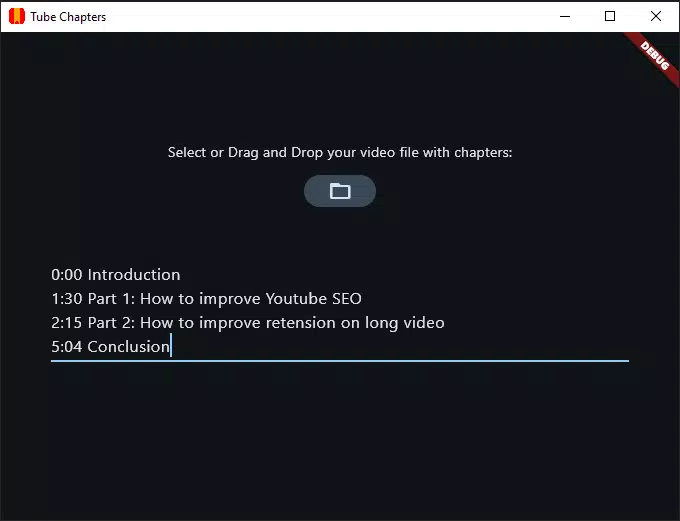
- Instant Timestamp Editing: Users can view and modify chapter timestamps in real time within the app. This functionality supports quick corrections and reorganization, ensuring that video segments are accurately labeled for optimal viewer navigation.
- Free and Standalone Design: Tube Chapters operates as a self-contained application with no additional dependencies. It does not require extensions, cloud accounts, or subscription fees, making it accessible to creators across all experience levels and budget ranges.
For example, a YouTuber editing a 20-minute tutorial in Adobe Premiere can export their chapter markers to Tube Chapters, review them on a mobile device, and make last-minute adjustments before uploading to YouTube. Similarly, a content team using DaVinci Resolve can use the app to standardize chapter formatting across multiple videos, improving brand consistency and audience retention.
Interface, UX & Performance
The user interface of Tube Chapters is designed with clarity and functionality in mind, prioritizing ease of use for creators who may not have extensive technical expertise. The layout appears minimalistic, with a focus on file import, timestamp display, and editing tools. Navigation is straightforward, allowing users to quickly access their video files and associated chapter data. The app’s responsiveness is consistent across various Android device categories, though specific performance metrics were not provided by the developer.
Although the developer did not list formal performance metrics, the app’s lightweight size of 2.4 MB suggests efficient resource usage. It is likely optimized for smooth operation on mid-range and high-end Android devices, minimizing lag during file loading and editing. Stability appears to be a core design goal, as the app functions without requiring background services or persistent permissions. The absence of ads or in-app purchases further supports a clean and distraction-free experience. Users can expect reliable performance during short editing sessions, particularly when working with videos that have a moderate number of chapters.
Platform Compatibility & Technical Requirements
Tube Chapters is available exclusively on the Android platform, making it accessible to users of Android smartphones and tablets. The app requires no specific minimum OS version, though the developer did not disclose formal compatibility details. It is distributed as a standalone package with a file size of 2.4 MB, indicating a lightweight footprint suitable for devices with limited storage. The latest version, 1.0, was released on August 1, 2024, marking the initial public launch of the application.
While the developer did not specify exact device requirements or supported Android versions, the app’s small size and standalone nature suggest broad compatibility with most modern Android devices. Users are advised to ensure their device meets standard Android system requirements for app installation. No additional software or system-level permissions are required, simplifying the installation process and reducing potential security concerns.
Pros and Cons
Pros
- Free to download and use with no hidden costs or subscriptions.
- Standalone application with no need for plugins or extensions.
- Supports multiple professional NLE systems, enhancing workflow flexibility.
- Lightweight size (2.4 MB) ensures fast installation and minimal storage usage.
- Direct import of chapter data from editing software improves efficiency.
Cons
- Platform availability is limited to Android; no iOS version was provided.
- Specific OS requirements and device compatibility were not disclosed.
- Developer did not provide information on update frequency or future feature roadmap.
- Limited to chapter timestamp management—no additional video editing tools included.
- No integration with YouTube’s API or direct upload functionality.
FAQ
Is Tube Chapters available for iOS devices?
As of the current release, Tube Chapters is only available for Android. There is no official iOS version announced.
Can I use Tube Chapters without a video editing software?
The app is designed to work with video files that already have chapter data from non-linear editing systems. It does not generate chapters from scratch, so a compatible NLE is required for full functionality.
Is the app safe to install?
Yes, Tube Chapters is a standalone, free application with no known security risks. It does not require sensitive permissions and has no ads or in-app purchases.
How often is the app updated?
The developer has not disclosed the update schedule. The current version is 1.0, released on August 1, 2024.
Can I export chapter data directly to YouTube?
Tube Chapters allows users to edit chapter timestamps but does not include direct upload functionality to YouTube. Users must manually input the data during the video upload process on YouTube’s platform.
Final Thoughts
Tube Chapters delivers a focused and efficient solution for video creators who need to manage chapter timestamps for YouTube content. Its compatibility with major editing platforms, combined with a free, standalone design, makes it a valuable addition to any content creator’s toolkit. While it lacks broader editing features or cross-platform availability, its specialized function is executed with precision and simplicity. Creators who rely on Final Cut Pro X, Adobe Premiere, or DaVinci Resolve will find this tool particularly useful for streamlining their post-production workflow. The app’s lightweight nature and ease of use ensure minimal disruption to existing processes.
For independent creators and small production teams looking to enhance viewer engagement without adding complexity, Tube Chapters offers a smart, no-frills solution. It fills a niche gap in the video production ecosystem by bridging the gap between editing software and YouTube publishing. With its clear purpose and straightforward interface, it stands out as a practical utility in a crowded market.
Download Tube Chapters now


